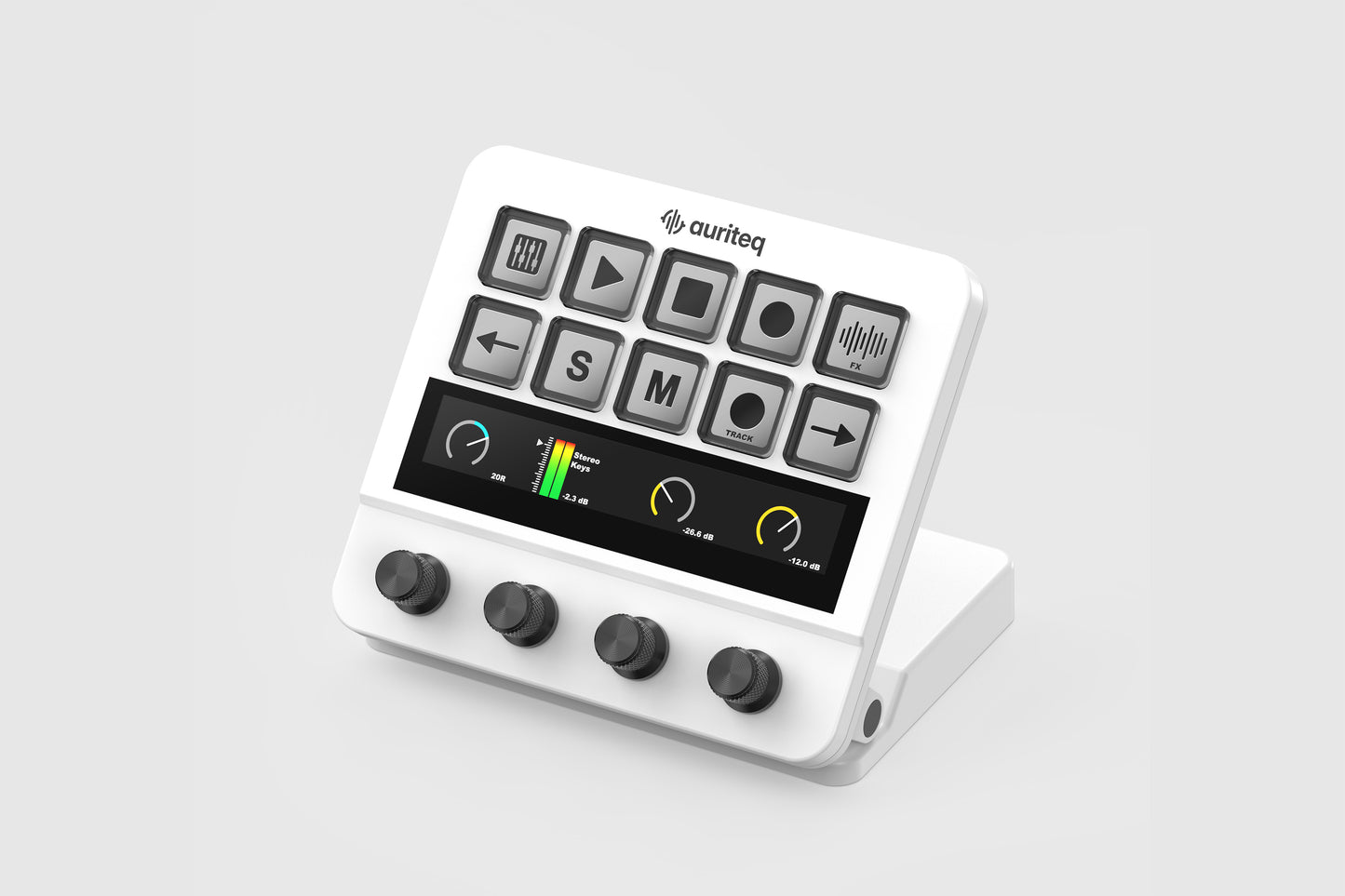
Auriteq Flow

Auriteq Flow

The most advanced & intuitive DAW controller for Ableton Live, Logic Pro & FL Studio


The Auriteq Flow offers deep integration with Ableton Live, FL Studio, and Logic Pro, giving you direct control over your entire DAW. Adjust volume, panning, effects, instruments and third-party plugins instantly - no manual mapping required, just plug in and start creating.

This DAW controller lets you assign your favorite plugins, instruments, and even full chains to buttons, so you can load them onto tracks with a single press. You can also save plugin and instrument settings directly, making your workflow faster and more efficient.

Reduce clicking, trust your ears, and stay focused from first idea to final master. The Auriteq Flow significantly speeds up your workflow by putting your most-used actions, plugins, and controls just one press away.

The controller can replace your mouse and keyboard, and even reduce the need for your monitor by providing tactile control and real-time visual feedback. The integrated displays behind the buttons and the touch bar update dynamically to reflect what’s happening in your DAW, keeping everything accessible directly on the hardware.

Pre-mapped with plugins and their key parameters, you can simply plug it in and start creating. You can also modify any mapping to suit your workflow.

From broad adjustments to 0.1 dB precision, the Auriteq Flow is designed to support every stage of your mix - from shaping the overall balance at the beginning, to the final stage, where you need to do those 0.1 dB adjustments to get your vocals sitting perfectly in the mix - a level of precision that’s nearly impossible to achieve with a mouse.

The Auriteq DAW Controller also works as a powerful USB hub, featuring two USB 3.1 ports and one USB-C port on the back. Connect essential peripherals such as an audio interface, external drive, or mouse directly through the controller and keep your workspace clean and organized.


Choose your color
Regular price 179,00€
Regular price 199,00€ Sale price 179,00€
Launch Offer Sold out

Free Delivery - 2-year warranty


Native integration for

View full details
199,00€179,00€Launch Offer

One Device. Every Workflow.

The Auriteq Flow is more than a controller — it’s the new center of your studio. It replaces your mouse, keyboard, and screen, bringing your entire workflow into one intuitive surface. See the state of every track and plugin in real time, insert any plugin with a single press, and control every parameter with precision and focus.

Control any plugin or audio effect

The Auriteq Flow lets you control the parameters of any plugin - effects, instruments, and built-in devices - in Ableton Live, Logic Pro, and FL Studio natively.

This means it’s truly plug & play - no need to spend your valuable time mapping everything yourself. Pre-mapped and ready out of the box, it can also be fully customized in seconds, directly from the controller or the companion app, so you decide what controls what.

Thanks to the integrated touchscreen, you can simply swipe left or right to access and control all parameters of a plugin - it’s entirely up to you how you organize them.

Add effects, plugins, chains, and presets with a single press

The Auriteq Flow lets you instantly load built-in effects, third-party plugins, instruments, and even complete chains of multiple plugins at the touch of a button.

Organize your plugins and chains into folders so your favorites are always within reach. You can also save plugin settings, full chain configurations, and even complete track setups, allowing you to recall them instantly on any new track.

For example, store three different vocal chains — each with its own detailed settings — and switch between them in seconds to compare and refine your sound. It’s a powerful workflow upgrade that means less time browsing and more time creating.

Control volume, panning, and sends

The Auriteq Flow gives you ultra-accurate control over your mix, allowing precise adjustments far beyond standard MIDI resolution. Fine-tune levels, balance your stereo image, and shape your sends with smooth, responsive control — giving you the precision you need for detailed mixing without compromise.

Mix and master like a pro

Control and visualize the volume of up to eight tracks at once. The Auriteq Flow lets you mix with precision by adjusting the volume of eight tracks simultaneously, while clearly displaying their levels to give you an accurate picture of your mix.

You can easily move the 8-track selection left or right using the arrow buttons, allowing you to navigate large sessions effortlessly.

This scene also includes an ultra-precise VU meter, a mono button for quickly checking your mix in mono, and a LUFS mode that displays loudness levels based on the industry-standard ITU-R BS.1770 measurement.

Navigate the timeline with ease

The Auriteq DAW Controller makes it simple to move through your project using the arrangement controls, allowing you to zoom horizontally and vertically, move the playhead, and set markers directly from the controller. You can also jump instantly between markers — a powerful feature that lets you move to any section of your song in seconds.

This is especially useful during recording sessions when you may be away from your computer, allowing you to repeat takes and navigate your project without reaching for your mouse or keyboard.

Record without using your mouse or keyboard

Recording becomes effortless with the Auriteq Flow DAW Controller. The recording scene lets you arm tracks, start recording, and monitor peak levels directly from the controller.

With advanced timeline navigation, you can quickly redo takes or jump to any section of the song to record again — all without touching your mouse or keyboard.

If you’re recording yourself, it’s a true workflow upgrade: no more walking back and forth between the recording room and the computer. Everything happens right from your recording position.

In FL Studio, the Auriteq Flow also features a dedicated sequencer scene, allowing you to use the controller as a hardware-style step sequencer.

See what the Auriteq Flow can do

Below, you will be able to navigate all the features that this DAW controller has to offer in Ableton Live, Logic Pro and FL Studio. Simply hover your mouse over a button or knob to see its action.

Mapping plugin parameters

The Auriteq Flow DAW Controller makes parameter mapping incredibly simple. The controller comes pre-mapped for the vast majority of plugins and built-in effects, but if you ever want to customize a mapping, it takes less than a minute.

The mapping process is exactly the same on every DAW.

Organizing your plugins and chains

The Auriteq Flow lets you organize your plugins, effects, instruments, chains, and even track presets into folders for quick access, allowing you to insert any of them with a single button press. You can save individual plugins or entire chains — with or without their settings — so you can instantly load them whenever you need them.

There are multiple ways to save them into slots in the controller:

Control your Mac or PC

Of course, the Auriteq Flow also lets you control your Mac or PC and integrates with a wide range of apps such as Premiere, Zoom, and OBS Studio via third-party software. Launch applications, open folders, and create custom shortcuts or hotkeys for virtually any app — all directly from the controller.

Feature Comparison

FeatureAbleton Logic FL Studio
Playback control (play, stop, record)
Track control (Solo, Mute, Arm)
Volume control + level meter
Pan control
Send control
Control any plugin & built in effect
Insert any plugin & built in effect Works with some limitations
Clip recording scene
Step sequencer
Device control
Control and visualize volume of 8 tracks
Control and visualize panning of 8 tracks
Control and visualize sends of 8 tracks
Mastering Suite: VU Meter, Master Meter, RMS, LUFS Display and Vectorscope
Switch to mono (listen to the full mix in mono)
Map your own shortcuts/series of shortcuts
Track name scene
Track coloring scene
  • Description

    Auriteq Flow is a DAW controller designed to provide direct, hands-on control over music production workflows, reducing reliance on a mouse and keyboard. It integrates with major DAWs and allows control over plugins, effects, and core functions from a single interface.

    The controller comes pre-mapped for a wide range of plugins, with commonly used parameters already assigned, enabling immediate use without manual configuration. Users can also customize mappings to suit their workflow.

    Plugins, presets, and effect chains can be organized and triggered directly from the controller, allowing faster access compared to navigating DAW menus. Saved configurations can be recalled instantly.

    Auriteq Flow provides control over mixing parameters such as volume, panning, sends, and automation. Adjustable control sensitivity allows both broad adjustments and fine changes, including high-resolution level control.

    The device supports screen-independent operation by providing visual feedback and tactile control directly on the hardware, enabling users to work without continuously referencing the computer display.

    A dedicated recording mode allows users to arm tracks, monitor input levels, and start or stop recording directly from the controller. This enables recording from a distance without interacting with the computer.

  • Specifications

    • Interface: USB-C
    • Ports: 2x USB-C, 2x USB 3.1
    • Power: 5V 500mA (USB-C powered)
    • Included: Controller + 1,5m USB-C to USB-A cable
    • OS Compatibility: Mac OS Arm64, Mac OS x64, Windows Arm64, Windows x64
    • DAW compatibility: Ableton Live 9.0 and above, Logic Pro, FL Studio